Open sourceMITLocal-firstv0.12.1

Build and run API tests visually

APIWeave is an open-source visual API testing tool for Windows, macOS, and Linux. Connect requests, extract response data, and add assertions to build multi-step test workflows that run on your machine — without a required account.

API tests you can watch run — every node lights up as it executes.

Windows · macOS · Linux — no account required

A 76-second tour cut from real recordings of the app. Unmute for the soundtrack.

Worked example

Test a complete API workflow, from login to final assertion

A workflow is the test: nodes wired in order, each one building on the response before it. This is the loop APIWeave is built around.

  1. Send a login request

    POST credentials to the login endpoint and let the workflow keep the response.

  2. Extract the returned token

    A JSONPath extractor pulls the token out of the response and stores it as a variable.

  3. Use the token in the next request

    The following request sends it as a bearer header, so nothing is copy-pasted between runs.

  4. Assert the response

    Check the status, a header, a cookie, or a value in the body — a broken contract fails the run.

  5. Inspect the failing node

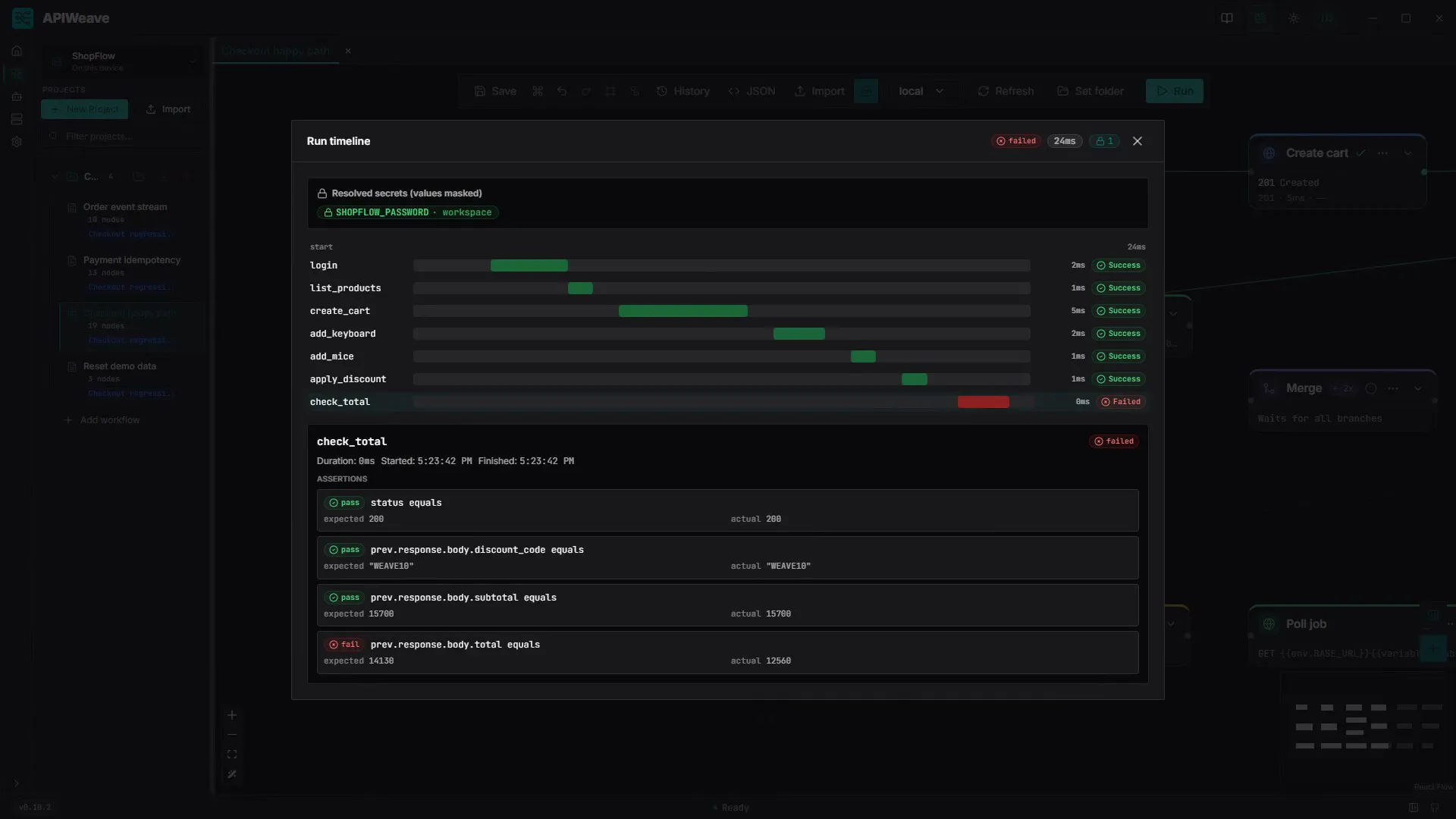
    Open the run's timeline and click the red bar: every rule the assertion checked, with its expected and actual value.

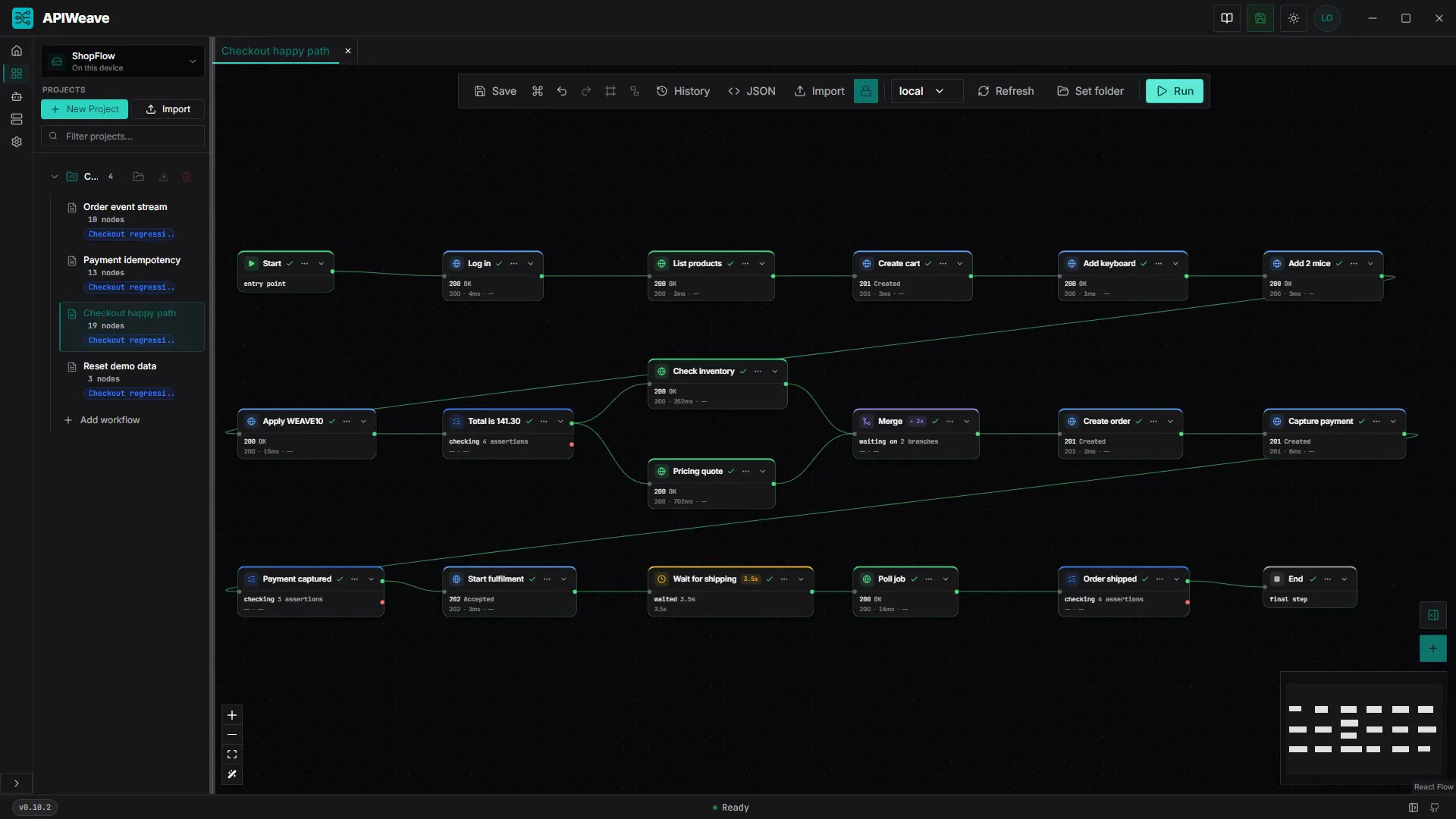
43 seconds, in the order of the built-in tutorial: import ShopFlow's OpenAPI spec → the Log in request, its password a {{secrets.SHOPFLOW_PASSWORD}} reference → extract the returned token into {{variables.token}} and send it as a bearer header → local and staging environments → inventory and pricing in parallel, joined by Merge → an assertion on the 141.30 total → all 19 steps green. Captured from the desktop app.

Failures read at a glance

Here the demo API applies the WEAVE10 discount twice. The assertion Total is 141.30 turns red and the run never takes its pass branch. In the run timeline, its node card lists every rule with what it compared: status, discount code and subtotal pass, and body.total expected 14130 but got 12560.

  • prev.response.body.total equals
  • expected 14130
  • actual 12560

This loop is the whole tool in miniature. The request-chaining guide covers extractor paths, post-merge branch indexing, and how to reuse the login as its own step.

API testing features

Chain requests, extract data, and validate responses

Every visual here is the actual app. The colors are the app's own language: HTTP verbs, running amber, passing green, failing red.

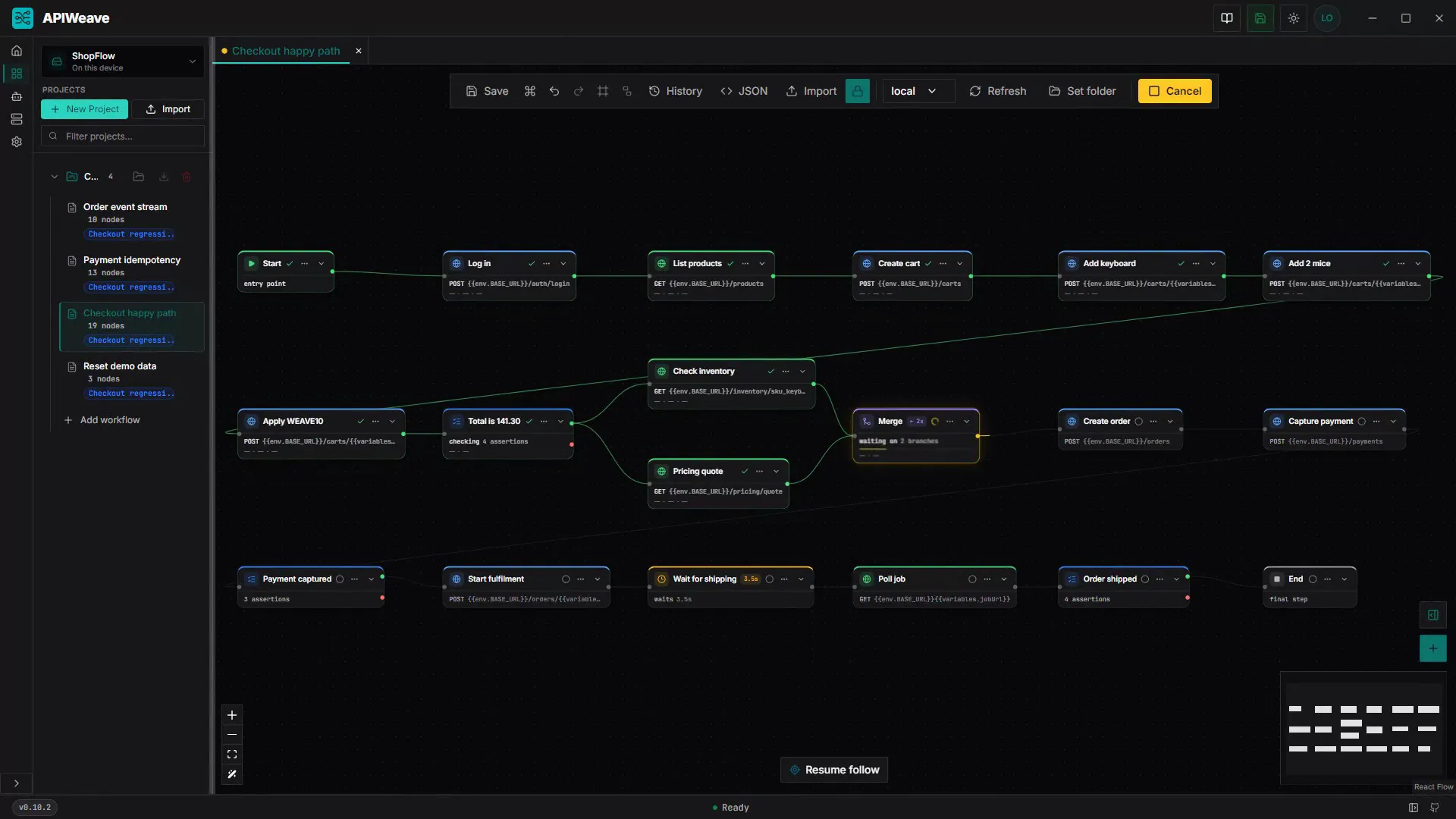
The 19-node Checkout happy path after a passing run: Log in, the parallel Check inventory and Pricing quote branches, Merge and End, every node green

A canvas that behaves like a run

Drag nodes onto the dot grid, wire them with bezier edges, and let the 700ms autosave do the saving. Workflows open as tabs; the minimap keeps big graphs navigable; JSON view is one click away.

  • HTTP request
  • Assertion
  • Delay
  • Merge
  • Call workflow
The run timeline's check_total card after a doubled WEAVE10 discount: status, discount code and subtotal rules pass, and prev.response.body.total equals fails with expected 14130, actual 12560

Assertions that branch

Eleven operators over status, headers, cookies, variables and the previous response — with pass and fail edges, so a broken contract takes its own path through the graph. The run timeline records each rule's expected and actual value.

AI agents in the loop

An embedded terminal puts a coding agent beside the canvas, driving APIWeave over MCP: diagnose a failed run, patch the graph under a revision guard, and watch the change land live. It launches whichever CLI you already have installed.

A local MCP bridge

Opt-in and loopback only: 54 tools over 127.0.0.1, one bearer token per install, and a secret surface that returns names and scopes but never a value. Off by default — nothing listens until you ask.

Runs you can rewind

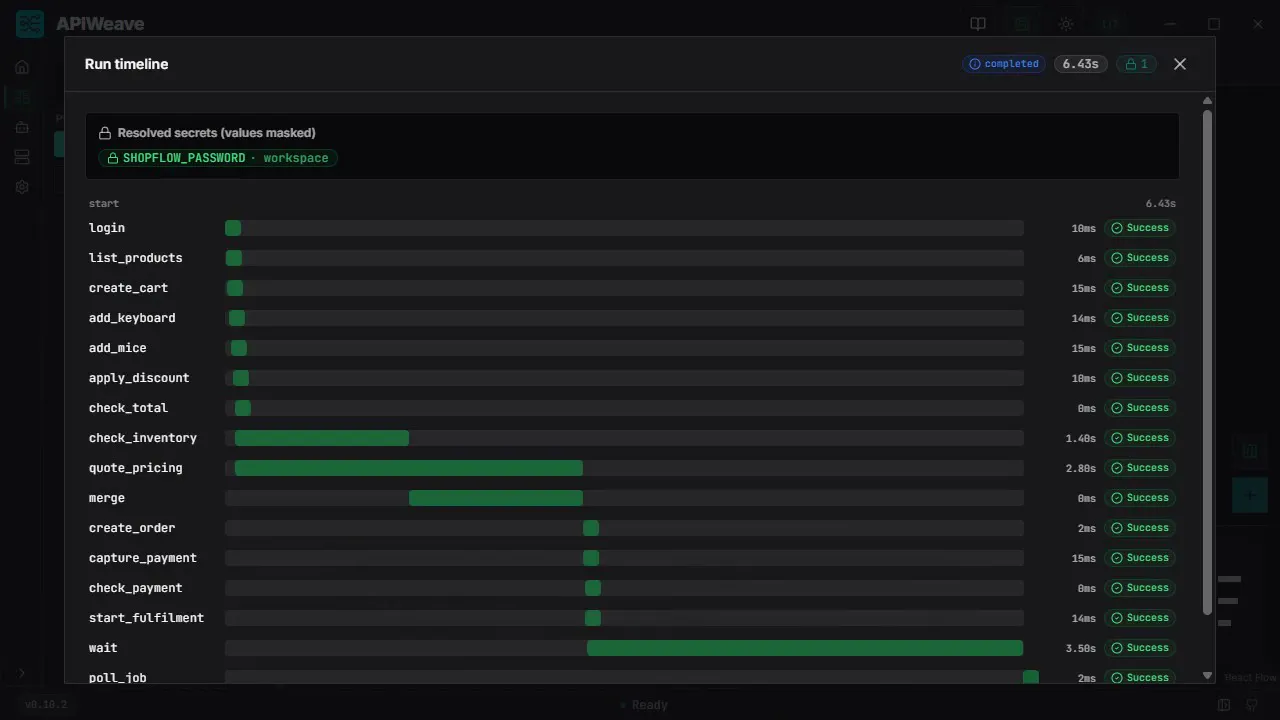
The timeline lays every node out as a waterfall — parallel branches overlap and Merge waits for both. Click a bar for its status, duration, start and finish. A failed run ends at the red bar where it stopped, and that bar's card shows why: each assertion rule with its expected and actual value.

Variables that flow

JSONPath extractors chain responses into the next request, and the panel traces every value back to the node that produced it. Environments scope the values, and inheritance stacks them (base → staging → staging-eu).

Secrets sealed on your machine

Values are sealed into an encrypted store on your machine. Workflows reference {{secrets.*}}, the store is write-only at rest, and runs are masked before history is written. A workspace synced through git carries the reference, never the value.

Server-sent event streams

An SSE Stream node holds the subscription open while the rest of the graph runs: its Ready edge fires the request that triggers the events, a finish rule such as event equals order.shipped closes it, and every collected event lands in its output for assertions.

API drift, flagged on the node

Requests added from an OpenAPI spec remember their operation. Refresh the spec and a request whose endpoint moved gets a Check API badge naming the old and new path.

Drop a specification, get a workflow

  • OpenAPI 3
  • Swagger 2
  • HAR
  • cURL

Build workflows from OpenAPI, Swagger, HAR, and cURL

Import OpenAPI and Swagger definitions as ready-to-run request nodes, replay browser sessions from HAR, and paste a cURL command straight onto the canvas.

Import an OpenAPI specBuild your first workflow

Local-first

Run API tests locally, without a required account

APIWeave sends every request and evaluates every assertion on your machine, against your own environments. Install it, open the canvas, and run — there is nothing to sign up for and no telemetry.

What exactly stays on your machine? The local API testing guide sets out the boundary in full, including the one thing a “stays local” claim usually gets wrong.

  • No account and no sign-up
  • Requests and assertions run on your machine
  • Secret values stay in an encrypted local store
  • Windows, macOS, and Linux installers

Getting started

Create your first API test workflow

Three moves — assemble the graph, run it against an environment, inspect every result — then keep the workspace in a git repo you own.

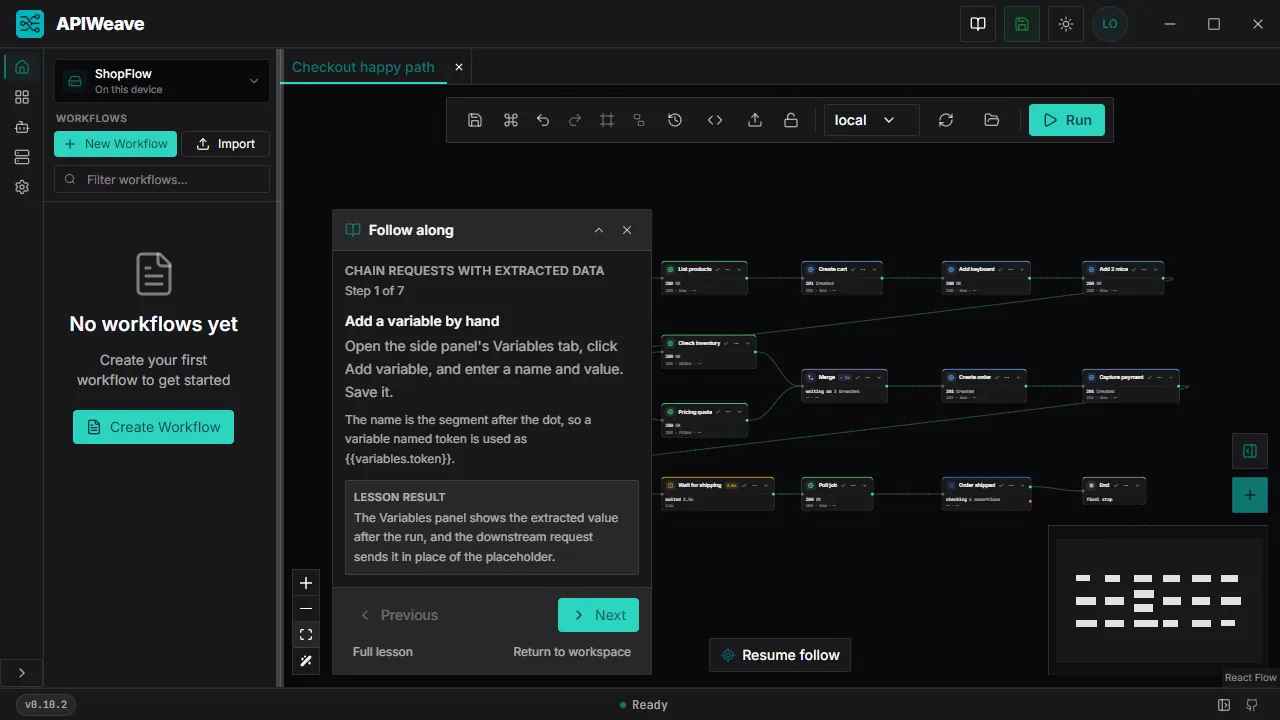
  1. The Follow along panel on step 1 of 7 of the Chain requests with extracted data lesson, over the Checkout happy path canvas

    Assemble

    Drag requests, assertions, delays and merges onto the canvas. Wire the branches, set expected statuses, extract what the next node needs. It autosaves as you go, and the built-in tutorials walk you through each step beside the canvas.

  2. The Checkout happy path running: Merge amber while it waits on the parallel inventory and pricing branches, completed nodes turning green

    Run

    Pick an environment and press run. Requests fire along the edges, variables resolve, and the camera follows the active branch so you never lose the thread.

  3. The run timeline: every node of the checkout run as a bar on one clock, inventory and pricing overlapping

    Inspect

    The timeline replays the run as a waterfall — every branch, every delay, every extraction, laid out on one clock. Open any node for its request, response and assertions.

Git sync

Sync through your own git repo

A tracked workspace is also a git repository. Connect a remote you own and your projects, workflows, and environments follow you between machines — with your own git credentials, and with the sensitive parts left out.

What the repository holds

  • Workspace, project, and workflow structure
  • Workspace environments and their plain variables
  • The {{secrets.NAME}} references a workflow needs

What it never holds

  • Secret values, their ciphertext, and the secret store
  • Run history and response bodies
  • User-scoped environments, node presets, and agents

A credential typed straight into a request or a variable is withheld the way an export withholds it: the repository holds <SECRET>, or leaves out a secret-named header. A request that sends <SECRET> needs a {{secrets.NAME}} reference instead. The value is supplied by the machine that runs the request, or by CI as an environment variable.

Your remote, your access

Connect GitHub, GitLab, or a bare repository on a drive by URL. Push access is write access and clone-only is read-only, because your host already decides that. When a push is refused, the workspace turns read-only and keeps committing locally.

A merge by record and field

When both machines moved, the app merges by record, node and field. Edits that touch different things are combined in a real merge commit; where the same field changed differently, you choose Your copy or Remote copy, and nothing is overwritten.

Commits on your schedule

Auto mode commits about 30 seconds after your last edit and syncs on its own. Manual mode waits for Sync now and shows what the commit holds first. The header says where the workspace stands in words and an icon, never colour alone.

There is no APIWeave account and no hosted runner. The history lives on your git host, and apiweave run <repo folder> runs a checkout in your own CI.

Questions

APIWeave questions and answers

What the tool is, what it runs, and how a workspace moves between machines — in plain terms.

  • What is visual API testing?

    It means building an API test as a graph instead of a script. Each node is a step — an HTTP request, an assertion, a delay, a merge, or a call to another workflow — and the edges are the order the run follows. You assemble the test on a canvas, then watch it execute node by node.

  • Can I chain multiple requests together?

    Yes. Requests run in graph order, so one response can feed the next. A typical workflow logs in, extracts the returned token, and sends it as a bearer header on the following request — no copy-pasting between runs.

  • Can I extract a response value for a later request?

    Yes. JSONPath extractors pull values out of a response — a token, an ID, a total — and store them as variables that later nodes reference. The variables panel traces each value back to the node that produced it.

  • Do I need an account to use APIWeave?

    No. APIWeave is local-first: you install the desktop app and build, run, and store workflows with no account at all. To move a workspace between machines you connect a git remote you own — such as a GitHub or GitLab repository — so syncing needs no APIWeave account either.

  • Which platforms does APIWeave support?

    Windows, macOS, and Linux. The desktop app ships installers for all three. Git sync needs the git command installed on the machine; a workspace that stays local runs without it.

  • Which API definition formats can I import?

    OpenAPI 3.x and Swagger 2.0 definitions import as ready-to-run request nodes, HAR files replay a recorded browser session, and you can paste a cURL command straight onto the canvas.

  • How does a workspace sync without a cloud service?

    A tracked workspace is written to a git repository on your machine as a tree of JSON files, and every change becomes a commit. Connect a remote and the app fetches, integrates, and pushes on its own; in manual mode it waits for Sync now. The history lives on the git host you chose, and the app only speaks plain git to it.

  • What is in the repository, and what never is?

    The repository holds the workspace, its projects, its workflows, and its workspace environments with their plain variables. Workflows keep the {{secrets.NAME}} references you wrote, so it says which secrets a workflow needs. Secret values and their ciphertext, the secret store itself, run history and response bodies are never written to it. Request definitions are, because they are the workflow; a credential typed into a request or a variable is withheld as <SECRET>, or a secret-named header is left out.

  • Do my secret values ever leave my machine?

    Not through git. The repository carries secret references such as {{secrets.apiToken}}, never the values behind them, and CI supplies each value as an environment variable. When a workflow uses a secret, the value is sent to the API under test as part of that request — from the machine running it.

  • What happens when two machines change the same field?

    APIWeave merges by record, node and field. Changes that do not overlap are combined in a real merge commit; where the same field changed differently, nothing is pushed or imported until you pick Your copy or Remote copy for it. A merge that waits survives quitting the app.

  • Can someone else open my workspace?

    Yes, if they can read the repository. In the workspace switcher they choose Open from git…, paste the URL, and the app clones it, imports the workspace, and tracks it in auto mode. They set their own secret values, because none are in the repository.

  • What does git sync not do yet?

    A workspace syncs one branch, with no branch picker and no pull requests from the app. Environment inheritance is not carried into the repository, and a workflow's own version history in the app stays separate from git history.

  • Is APIWeave open source?

    Yes. The desktop app is public on GitHub, free to use under the MIT licence, and runs without a required account.

Download APIWeave for your desktop

Install the app, open the canvas, and watch your first API test workflow go green. No account, no configuration, no telemetry.

MIT · local-first · Windows, macOS, Linux

Not sure which build you need? The download page lists the artifact for each platform and the one caveat that applies to it.